Print preflight
That design looks great.
Will it actually print?
AI-generated and Canva designs miss print requirements all the time. Wrong color mode, no bleed, low resolution. Gate checks your file and tells you exactly what needs fixing before it goes to press.


GATE catches these before they reach the press.
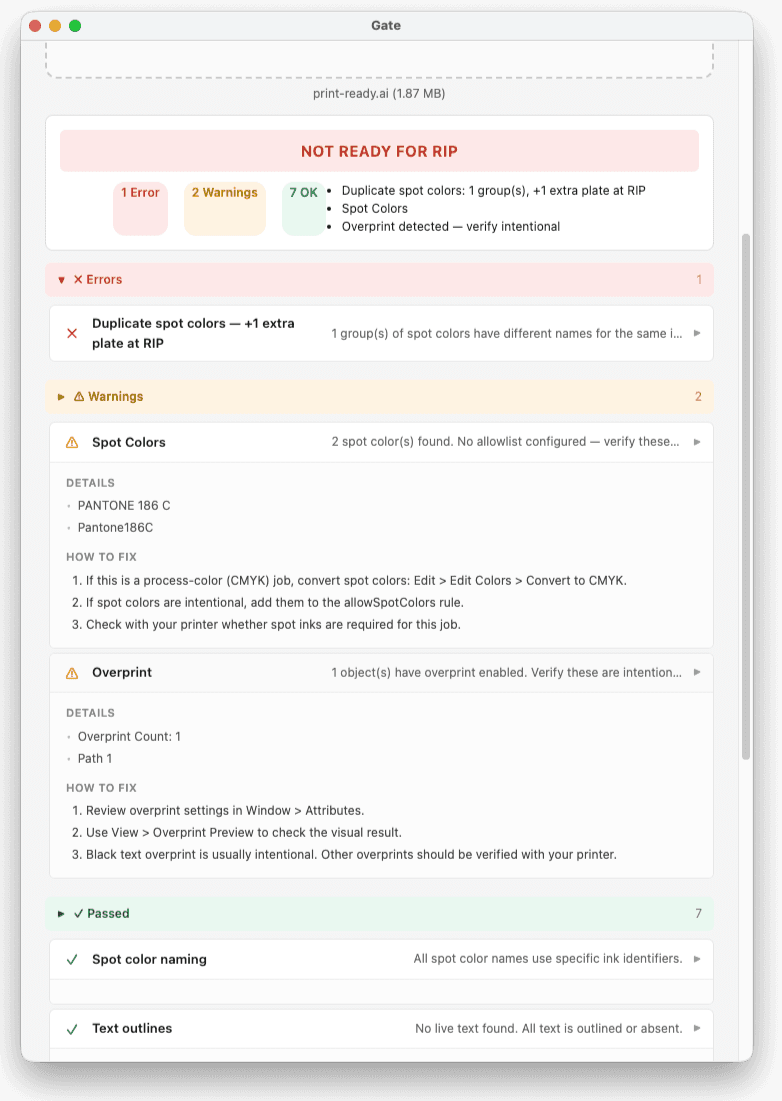
It opens your real production files and checks for issues automatically. The same problems you just saw.
What GATE checks
- ✓Duplicate spot colors
- ✓Unoutlined fonts
- ✓RGB in CMYK
- ✓Unapproved spot colors
- ✓Low-res images
- ✓Thin strokes
- ✓Missing links
- ✓Wrong artboard size
- ✓Wrong PDF preset
How it works
Drop files
Add vector, raster, or embroidery files: AI, EPS, PDF, PSD, PNG, DST, and more.
Check
Gate reads your file, extracts production data, and runs your preflight rules.
Fix or ship
Get a pass/fail verdict with fix steps for every issue. Export or share with your team.
Without Gate
- Duplicate spot colors slip through to RIP
- Live text discovered on press
- RGB files land in a CMYK workflow
- Hours wasted on manual checks every deadline
With Gate
- Instant checks: vector, raster, PSD, embroidery
- Detect common print issues automatically
- Fix steps included with every finding
- Works with your existing production workflow
For print shops
Running a shop? Set your specs once, automate the intake.
- ✓ Custom preflight rules per print method
- ✓ Shareable intake link for your customers
- ✓ Every file checked automatically on arrival
Private and secure
Your files stay local
The desktop app never uploads your files. Everything runs on your machine.
No account required
Download, install, check files. No signup, no login, no cloud dependency.
PrepressGate is built and supported by YFI Global, software for the print industry.
Pricing
Personal
Free
Free for individual use
- Unlimited checks, no restrictions
- All preflight rules included
- Export reports
macOS 12+ · Windows 10+
Team
Contact us
The gate at the front of your shop.
Learn more →- No Adobe software needed. Fully web-based.
- Custom intake form on your site, or use ours
- Multi-user dashboard with shared rules
- Batch & ZIP processing
- Results in seconds, available 24h
Text only · replies within 24h
Already a customer? Sign in
FAQ
Do I need Adobe software installed?▶
Desktop plan: yes. It runs against your own Illustrator (Mac or Windows). Team plan: no. Everything happens in your browser. You don't install anything.
How do my customers send me files?▶
Two ways with the Team plan: (1) drop in our hosted intake form, share the URL with customers, takes about a minute to set up; (2) wire the API into your existing website form so customers stay on your site. Either way, every submission lands as a job in your dashboard.
How long does setup take?▶
Desktop plan: about two minutes. Download, install, check files. Team plan: about one minute. Sign in, create an intake link, share the URL.
What file formats are supported?▶
Vector (AI, EPS, PDF, SVG), raster (PSD, PNG, JPG, TIFF, BMP, WebP), and embroidery (DST, PES, EXP). The browser demo supports PDF, SVG, and raster formats.
Where do my files go?▶
Team plan: files are processed on our infrastructure, kept for 3 days so you have time to download and act on the result, then automatically deleted. The result history (verdict, findings, file name, hash) stays in your dashboard. Files are not shared with any third party. Desktop plan: files never leave your machine.
Download and check your files in seconds.
No account required. Start immediately.
Need help fixing a file?
Send your project and we’ll review it and reply with a quote based on what’s needed.